Sabtu, 01 Maret 2014

Java swing tutorial: Learning JList with code example


In this java swing JList tutorial we will learn important properties and function of JList while working on task with examples. In my opinion best way to learn swing is to actually doing task and so I designed this tutorial around task. We will start with simple example and proceed with more  complex one step by step adding new functionality and in the course we will learn JList both concept and API. In this first example we need to implement a list which shows names of companies in sorted order. Before start coding let's see some fundamentals of JList:


1) JList is a GUI element available in javax.swing package which allows selection of one more element. Internally JList is backed up by two models: ListModel for holding data and ListSelectionModel for handling selection. JList also allows custom rendering via ListCellRenderer which can be used to draw a specific cell in customize manner.


2) JList elements are uneditable, JList does not support any rendering.


3) There are two ways to set model of JList either using JList.setModel() or JList.setListData().


4) JList implements Scrollable interface and can be put on Scrollpane. JList also supports auto-scrolling. visibleRowCount property of JList is used to display number of rows when a JList is placed on Scrollpane.you can change it by using method setVisibleRowCount().


5) JList cell's width and height is determined by width of widest element and height of highest element but you can also customize it using methods setFixedCellWidh() and setFixedCellHeight().


JList example in Java Swing


Task: Implement JList which display list of electronic trading in sorted ascending order.


Let's see an example of dispalying JList in Swing:


Showing JList in Swing is very easy what you need to do is: create a JList, set its model, put the JList in Panel and done. For creating model for JList you can extend AbstractListModel class which implements ListModel and you can store your data inside this class in either Array or Collection classes as shown in below example of JList:


public class JListCodeDemo {


      public static void main(String args[]){


      JFrame listFrame = new JFrame();


      JPanel contentPane = (JPanel) listFrame.getContentPane();


      JList list = new JList(new AbstractListModel() {


      String[] companies = {"Stock trading", "Futures trading", "Options trading"};


      @Override


      public int getSize() {


      return companies.length;


      }


      @Override


      public Object getElementAt(int index) {


      return companies[index];


      }


      });


      contentPane.add(list);


      listFrame.pack();


      listFrame.setVisible(true);


      listFrame.setDefaultCloseOperation(JFrame.EXIT_ON_CLOSE);


      }

}


Now to display elements in Sorted Order we need to sort the data which we are going to show in JList. For this purpose we will create our own custom ListModel and store our data in List and then sort this list using Collections.sort() method which will sort Strings on there natural order. Here is the code:


class ElectronicTradingListModel extends AbstractListModel{


      private List electronic_trading_list = new ArrayList();


      public ElectronicTradingListModel(){


      electronic_trading_list.add("Equity Trading");


      electronic_trading_list.add("Futures Trading");


      electronic_trading_list.add("Options Trading");


      electronic_trading_list.add("Currency trading");


      Collections.sort(electronic_trading_list);


      }


      @Override


      public int getSize() {


      return electronic_trading_list.size();


      }


      @Override


      public Object getElementAt(int index) {


      return electronic_trading_list.get(index);


      }


}


Now just set this model as your list model by adding following line of code:


list.setModel(new ElectronicTradingListModel());


Let me know how you find this example of JList in Swing, how is my idea of having task based tutorial. To be frank I really liked this thought because it provides you a focus which is quite important otherwise you will lose in this huge API. So focus here is to learn fundamentals of JList and Swing by doing actual real world task. In the next JList tutorial we will see how to implement custom rendering on JList by our next task: Display currency trading in yellow color and Stock trading on red color


Here are some of my favorite java tutorial you may find interesting


Source:http://javarevisited.blogspot.com/2011/08/java-swing-tutorial-jlist-example.html

Call Java method on action menu or toolbar button click

This entry is part of the Maximo Java Development series.

In this post I will describe all the steps needed to execute custom Java code upon the selection of an entry in the action menu or the click of a button in the toolbar.

Add a sigoption

First you need to create a new sigoption. Open the Application Designer and select the application you want to modify. Select 'Add/Modify Signature Options' and create a new signature RUNJAVA.

Add the menu entry

The second step is to create the custom entry in the action menu (or a new button).
Select 'Add/Modify Select Action Menu' and create the new entry RUNJAVA of type OPTION. Beware that the name must be the same as the sigoption.

Grant sigoption permissions and test the dummy action

Before going on I recommend the test that the new menu entry is visible.
Go in the Security Groups application, select the group you want to be able to see and execute the custom code. Go in the Applications tab and select your application. Now you should see the RUNJAVA sigoption on the bottom of the page. Click on the checkbox to grant access to the new menu entry.

Disconnect and login with a user belonging to the chosen group, go in the application and verify that you see the new menu entry.
Now it's time to attach your Java code to it.

Write your Java code

The most suitable place to put your Java code is in the 'App Bean Class' which is the custom Java class that manages the application.
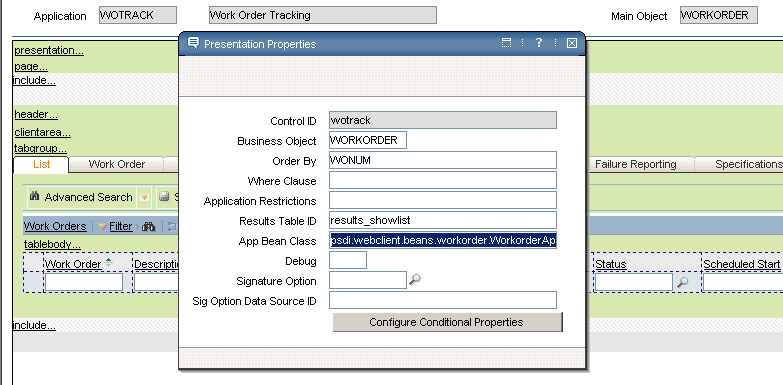
To determine which Java bean handles the application, open Application Designer and select the application, from the Action menu choose 'Toggle Show All Controls' and display the properties of the 'presentation' section. The 'App Bean Class' defines the Java class that you need to customize. Here is the WOTRACK application App Bean Class definition.

You should extend this class and create a new method with the same name of the sig option in the Java bean class (RUNJAVA in our example).
Don't forget to change the App Bean Class property setting your own custom class.
Here is an example of how the custom class should look like.

package cust.psdi.webclient.beans.workorder;

public class CustWorkorderAppBean extends psdi.webclient.beans.workorder.WorkorderAppBean
{
public int RUNJAVA() throws MXException, RemoteException
{
// put your custom code here
return EVENT_HANDLED;
}
}

Implement your custom logic in the RUNJAVA method and copy the class file under [SMPDIR]\maximo\applications\maximo\maximouiweb\webmodule\WEB-INF\classes folder. Rebuild and redeploy Maximo EAR file.


Source:http://maximodev.blogspot.com/2011/08/call-java-method-on-action-menu-or.html

How to Convert String to Integer to String in Java with Example


Converting String to integer and Integer to String is one of the basic tasks of Java and most people learned about it when they learn Java programming. Even though String to integer and Integer to String conversion is basic stuff but same time its most useful also because of its frequent need given that String and Integer are two most widely used type in all sort of program and you often gets data between any of these format. One of the common task of programming is converting one data type another e.g. Converting Enum to String or Converting Double to String, Which are similar to converting String to Integer. Some programmer asked question that why not Autoboxing can be used to Convert String to int primitive or Integer Object? Remember autoboxing only converts primitive to Object it doesn't convert one data type to other. Few days back I had to convert a binary String into integer number and then I thought about this post to document all the way I know to convert Integer to String Object and String to Integer object. Here is my way of converting String to Integer in Java with example :


String to Integer Conversion in Java


here are four different ways of converting String object into int or Integer in Java :


1) By using Intger.parseInt(String string-to-be-converted) method

This is my preferred way of converting an String to int in Java, Extremely easy and most flexible way of converting String to Integer. Let see an example of String to int conversion:


 //using Integer.parseInt


 int i = Integer.parseInt("123");


 System.out.println("i: " + i);


Integer.parseInt() method will throw NumberFormatException if String provided is not a proper number. Same technique can be used to convert other data type like float and Double to String in Java. Java API provides static methods like Float.parseFloat() and Double.parseDouble() to perform data type conversion.


2) Integer.valueOf() method

There is another way of converting String into Integer which was hidden to me for long time mostly because I was satisfied with Integer.parseInt() method. This is an example of Factory method design pattern in Java and known as Integer.valueOf(), this is also a static method like main and can be used as utility for string to int conversion. Let’s see an example of using Integer.valueOf() to convert String into int in java.


//How to convert numeric string
= "000000081" into Integer value = 81


int i = Integer.parseInt("000000081");


System.out.println("i: " + i);


It will ignore the leading zeros and convert the string into int. This method also throws NumberFormatException if string provided does not represent actual number. Another interesting point about static valueOf() method is that it is used to create instance of wrapper class during Autoboxing in Java and can cause subtle issues while comparing primitive to Object e.g. int to Integer using equality operator (==),  because caches Integer instance in the range -128 to 127.


How to convert Integer to String in Java


String to integer conversion, Int to string example In the previous example of this String to int  conversion  we have seen changing String value into int primitive type and this part of Java tutorial we will see opposite i.e. conversion of Integer Object to String. In my opinion this is simpler than previous one. You can simply concatenate any number with empty String and it will create a new String. Under the carpet + operator uses either StringBuffer or StringBuilder to concatenate String in Java. anyway there are couple of more ways to convert int into String and we will see those here with examples.


Int to String in Java using "+" operator

Anything could not be more easy and simple than this. You don't have to do anything special just use "+" concatenation operator with String to convert int variable into String object as shown in the following example:


String price = "" + 123;


Simplicity aside, Using String concatenation for converting int to String is also one of the most poor way of doing it. I know it's temptation because, it's also the most easiest way to do and that's the main reason of it polluting code. When you write code like "" + 10 to convert numeric 10 to String, your code is translated into following :


new StringBuilder().append( "" ).append( 10 ).toString();


StringBuilder(String) constructor allocates a buffer containing 16 characters. So , appending upto to 16 characters to that StringBuilder will not require buffer reallocation, but appending more than 16 character will expand StringBuider buffer. Though it's not going to happen because Integer.MAX_VALUE is 2147483647, which is less than 16 character. At the end, StringBuilder.toString() will create a new String object with a copy of StringBuider buffer. This means for converting a single integer value to String you will need to allocate: one StringBuilder, one char array char[16], one String and one char[] of appropriate size to fit your input value. If you use String.vauleOf() will not only benefit from cached set of values but also you will at least avoid creating a StringBuilder. To learn more about these two, see my post StringBuffer vs StringBuilder vs String 


One more example of converting int to String

There are many ways to convert an int variable into String,  In case if you don't like above example of string conversion than here is one more example of doing same thing. In this example of converting Integer to String we have used String.valueOf() method which is another static utility method to convert any integer value to String. In-fact String.valueOf() method is overloaded to accept almost all primitive type so you can use it convert char, double, float or any other data type into String. Static binding is used to call corresponding method in Java. Here is an example of int to String using String.valueOf()


String price = String.valueOf(123);


After execution of above line Integer 123 will be converted into String “123”.


Int to string using String. format()

This is a new way of converting an int primitive to String object and introduced in JDK 1.5 along-with several other important features like Enum, Generics and Variable argument methods. String.format() is even more powerful and can be used in variety of way to format String in Java. This is just another use case of String.format() method for displaying int as string. Here is an example of converting int to String using String.format method:


String price = String.format ("%d", 123);


Indeed conversion of String to Integer object or int primitive to String is pretty basic stuff but I thought let's document for quick reference of anyone who might forget it or just wanted to refresh it. By the way if you know any other way of string-int-string conversion than please let us know and I will include it here.


Source:http://javarevisited.blogspot.com/2011/08/convert-string-to-integer-to-string.html

Jumat, 28 Februari 2014

How to increase java heap space on Maven and ANT


Many times we get java.lang.OutOfMemoryError: java heap space while building our project either by using maven or ANT just because heap size is not enough to build the project. At this point we just want to increase the heap size used by ANT or MAVEN and this java tip will let you do this:


How to increase Java Heap size for Maven on Linux/Unix


1. Open your mvn.sh file and add the following line:

export MAVEN_OPTS=-Xmx512m

this will allow to specify java heap space based on your project needs.


How to increase Java Heap space for Maven on Windows


1.      go to C:\apache-maven-2.2.1\bin


2.      open your mvn.bat file and add the following line :


set  MAVEN_OPTS=-Xmx512m

next time you run maven commands like mvn clean or mvn install it will use this heap size.


This article is in continuation of my earlier post on java heap 10 points on java heap space  if you haven’ read that you may find some useful info there.


How to increase Java Heap size/space/memory for ANT on Linux/Unix


Similar to Maven you can specify ANT_OPTS to specify JVM specific arguments for ANT build tool. Here is step by step guide to change the java heap space for ANT:


1.      Go to ANT_HOME directry (directory where Ant has been installed)


2.      Open ant.bat file and add following line on it

export ANT_OPTS=-Xmx512m

some time you may need to put the value –Xmx512M inside double quotes.


3.      Done next time you run “ant” it will use modified java heap size and will not throw OutOfMemoryError till the new limit reached.


How to increase Java Heap size/space/memory for ANT on Windows


As shown above for Linux ANT_OPTS can also be used specify JVM specific arguments for ANT in windows.  Here is step by step guide to increase the java heap memory for ANT in Windows:


4.      Go to ANT_HOME directory (directory where Ant has been installed)

5.      Open ant.bat file and add following line on it

set ANT_OPTS=-Xmx512m

some time you may need to put the value –Xmx512M inside double quotes.

6.      Done next time you run “ant” it will use modified java heap size and will not throw OutOfMemoryError till the new limit reached.


Related post:


Source:http://javarevisited.blogspot.com/2011/08/increase-heap-size-maven-ant.html

How to use Java 1. 7 Multiple Catch Block with example - JDK 7 tutorial


As release of JDK 7 approaching General Availability (GA) on 2011/07/28, I thought to have a look on language enhancement as part of project coin, also called as Small language enhancements or JSR 334. Though there is not any major changes like Enum or Generics of Java 1.5,  but they are still very useful, in terms of simplifying your day to day programming task. Some of the interesting changes are allowing String in Switch cases,  , inclusion of fork join framework in JDK itself , , type inference using diamond operator, automatic resource management using  try with resource feature, and ability to catch multiple Exception in single catch block . In this Java 7 tutorial, we will learn how multi catch block of JDK 1.7 makes Exception handling code simpler and elegant. Multiple catch block will allow you to catch multiple exceptions in one block but it’s only available in JDK7 and you need to compiler your code with source 1.7. This article also shows you how to use JDK 7 multiple catch block with example. I also recommend book Java 7 Recipes: A Problem-Solution Approach to learn more about all the changes made in JDK 1.7 and how to make effective use of them.


JDK 1. 7 feature: Improved exception handling using multi-catch block


jdk7 multi-cache block example tutorialJava has always been criticized for having checked exception and polluting code with cluttered exception handling code, multi-catch block in Java 1.7  certainly assuage those wounds. With multi catch block,  you can catch multiple exceptions in one catch block, which will eventually result in more readable code. Prior to JDK 7 if you want to catch two exceptions, you need to provide two catch blocks and if you have same code to run on these two blocks, then either you need to use finally block or just duplicate the code on two catch blocks. finally block is  not an ideal solution, because it will execute even if Exception is not thrown so ultimately lot of duplicate code which sometime makes code unreadable and clumsy. Now with JDK7 multi catch block we can catch multiple exception in one catch block separated by pipe (|) and reduce the code duplication. Let’s see an example of multiple exceptions catching in Java 7.


public static void main(String args[]) {


    Scanner scnr = new Scanner(System.in);


    String number = scnr.next();


    try {


        if (number.length() > 5) {


            throw new IllegalArgumentException();


        }


        Integer.parseInt(number);


    } catch (NumberFormatException | IllegalArgumentException e) {


        e.printStackTrace();


    }


}


In above code example or JDK7 multi-catch block we have used multiple catch block of JDK 1.7 and control will come on this block whenever code throws either NumberFormatException or IllegalArgumentException.


Java 7  multiple catch block example tutorial


We have seen code making use of this new Java 7 feature of catching more than one Exception in one catch block. In our example, we are catching NumberFormatException and IllegalArgumentException together and her we will verify that by entering input which will result in both type of Exception one by one. If we are able to catch both Exception than it's proven.


Testing of JDK 1.7 multi-cache block  


If we will enter any number with alphabets, than it will throw NumberFormatException as shown below :


Input: 23ff


java.lang.NumberFormatException: For input string: "23ff"

        at java.lang.NumberFormatException.forInputString(NumberFormatException.java:65)

        at java.lang.Integer.parseInt(Integer.java:492)

        at java.lang.Integer.parseInt(Integer.java:527)

        at jdk7demo.JDK7Demo.main(JDK7Demo.java:25)


Now let's enter number with more than 5 digit this will result in IllegalArgumentException as per our code.


Input :123333

java.lang.IllegalArgumentException

        at jdk7demo.JDK7Demo.main(JDK7Demo.java:23)


I used Netbeans 7 to compile and run this project. Setting up JDK 7 in Netbeans is very easy just download JDK7 and then click on Tool-->Java Platform and then click "Add Platforms" it will open a file browser just point out JDK7 installation directory and it will import JDK 1.7  binaries , source and docs and set it up for your use. One more thing you need to remember is that setting source as 1.7 because this new language feature is only available in JDK7. In next series of this JDK7 feature article we will see how to use String in Switch statement.


Recommended Book for further Reading

Java 7 Recipes: A Problem-Solution Approach By Josh Juneau, Carl Dea, Freddy Guime, John O'Conner


Source:http://javarevisited.blogspot.com/2011/07/jdk7-multi-cache-block-example-tutorial.html

Top 15 Java Multithreading, Concurrency Interview Questions Answers asked in Investment banks


Thread interview questions Java


Multi-threading and concurrency questions are essential part of any Java interview. If you are going for any Java interview on any Investment bank for equities front office position expect lots of muti-threading interview questions on your way. Multi-threading and concurrency is a favorite topics on Investment banking specially on electronic trading development and they grill candidate on many confusing java thread interview questions. They just want to ensure that the guy has solid knowledge of multi-threading and concurrent programming in Java  because most of them are in business of performance. High volume and low latency Electronic trading System which is used for Direct to Market (DMA) trading is usually concurrent in nature. These are my favorite thread interview questions on Java  asked on different on different time. I am not providing answer of these thread interview questions but I will give you hint whenever possible, some time hint is enough to answer. I will update the post further with detailed answers just like I did for 10 Singleton interview questions in Java recently.  With introduction of concurrency package in Java 5 questions on concurrent utility and concurrent collections are on rise as well. ThreadLocal, BlockingQueue, Counting Semaphore and ConcurrentHashMap are popular among those.


15 Java Thread Interview Questions and answers


1) You have thread T1, T2 and T3, how will you ensure that thread T2 run after T1 and thread T3 run after T2?


This thread interview questions is mostly asked in first round or phone screening round of interview and purpose of this multi-threading question is to check whether candidate is familiar with concept of "join" method or not. Answer of this multi-threading questions is simple it can be achieved by using join method of Thread class.


2) What is the advantage of new Lock interface over synchronized block in Java? You need to implement a high performance cache which allows multiple reader but single writer to keep the integrity how will you implement it?


The major advantage of lock interfaces on multi-threaded and concurrent programming is they provide two separate lock for reading and writing which enables you to write high performance data structure like ConcurrentHashMap and conditional blocking. This java threads interview question is getting increasingly popular and more and more follow-up questions come based upon answer of interviewee. I would strongly suggest reading Locks before appearing for any java multi-threading interview because now days Its  heavily used to build cache for electronic trading system on client and exchange connectivity space.


3) What are differences between wait and sleep method in java?


Another frequently asked thread interview question in Java mostly appear in phone interview. Only major difference is wait release the lock or monitor while sleep doesn't release any lock or monitor while waiting. Wait is used for inter-thread communication while sleep is used to introduce pause on execution. See my post wait vs sleep in Java for more differences


4) Write code to implement blocking queue in Java?


This is relatively tough java multi-threading interview question which servers many purpose, it checks whether candidate can actually write Java code using thread or not, it sees how good candidate is on understanding concurrent scenarios and you can ask lot of follow-up question based upon his code. If he uses wait() and notify() method to implement blocking queue, Once interviewee successfully writes it  you can ask him to write it again using new java 5 concurrent classes etc.


5) Write code to solve the Produce consumer problem in Java?


Similar to above questions on thread but more classic in nature, some time interviewer ask follow up questions How do you solve producer consumer problem in Java, well it can be solved in multiple way, I have shared one way to solve producer consumer problem using BlockingQueue in Java , so be prepare for surprises. Some time they even ask to implement solution of dining philosopher problem as well.


6) Write a program which will result in deadlock? How will you fix deadlock in Java?


Java thread interview questions and answers This is my favorite java thread interview question because even though deadlock is quite common while writing multi-threaded concurrent program many candidates not able to write deadlock free code and they simply struggle. Just ask them you have n resources and n thread and to complete an operation you require all resources. Here n can be replace with 2 for simplest case and higher number to make question more intimidating. see  How to avoid deadlock in java  for more information on deadlock in Java.


7) What is atomic operation? What are atomic operations in Java?


Simple java thread interview questions, another follow-up is do you need to synchronized an atomic operation? :) You can read more about java synchronization here.


8) What is volatile keyword in Java? How to use it? How is it different from synchronized method in Java?


Thread questions based on volatile keyword in Java has become more popular after changes made on it on Java 5 and Java memory model. It’s good to prepare well about how volatile variables ensures visibility, ordering and consistency in concurrent environment.


9) What is race condition? How will you find and solve race condition?


Another multi-threading question in Java which appear mostly on senior level interviews. Most interviewer grill on recent race condition you have faced and how did you solve it and some time they will write sample code and ask you detect race condition. See my post on Race condition in Java for more information. In my opinion this is one of the best java thread interview question and can really test the candidate's experience on solving race condition or writing code which is free of data race or any other race condition. Best book to get mastery of this topic is "Concurrency practices in Java'".


10) How will you take thread dump in Java? How will you analyze Thread dump?


In UNIX you can use kill -3 and then thread dump will print on log on windows you can use "CTRL+Break". Rather simple and focus thread interview question but can get tricky if he ask how you analyze it. Thread dump can be useful to analyze deadlock situations as well.


11) Why we call start() method which in turns calls run() method, why not we directly call run() method ?


Another classic java multi-threading interview question This was my original doubt when I started programming in thread. Now days mostly asked in phone interview or first round of interview at mid and junior level java interviews. Answer to this question is that, when you call start() method it creates new Thread and execute code declared in run() while directly calling run() method doesn’t create any new thread and execute code on same calling thread. Read my post Difference between start and run method in Thread for more details.


12) How will you awake a blocked thread in java?


This is tricky question on threading, blocking can result on many ways, if thread is blocked on IO then I don't think there is a way to interrupt the thread, let me know if there is any, on the other hand if thread is blocked due to result of calling wait(), sleep() or join() method you can interrupt the thread and it will awake by throwing InterruptedException. See my post How to deal with blocking methods in Java for more information on handling blocked thread.


13) What is difference between CyclicBarriar and CountdownLatch in Java ?


New java thread interview questions mostly to check familiarity with JDK 5 concurrent packages. One difference is that you can reuse CyclicBarrier once barrier is broken but you can not reuse ContdownLatch.


14) What is immutable object? How does it help on writing concurrent application?


Another classic interview questions on multi-threading, not directly related to thread but indirectly helps a lot. This java interview question can become more tricky if ask you to write an immutable class or ask you Why String is immutable in Java as follow-up.


15) What are some common problems you have faced in multi-threading environment? How did you resolve it?


Memory-interference, race conditions, deadlock, live lock and starvation are example of some problems comes in multi-threading and concurrent programming. There is no end of problem if you get it wrong and they will be hard to detect and debug. This is mostly experienced based interview question on java thread instead of fact based.


These were my favorite Java thread interview questions and mostly asked on Investment banks. This list is by no means complete so please contribute some of interesting java thread questions you have faced during interview. Purpose of this article is to collect and share great interview questions on multi-threading concept which not only helps on interview but opens door for learning new threading concept.


Update:


One of Javarevisited reader, Hemant has contributed some more thread interview questions in Java, though he hasn’t provide answer and left that job for me, I will certainly do when time allows, just like I have recently updated 10 Singleton interview question in Java with answers. If you guys know answers of this java concurrency questions than please post as comment:


Here is his comment “Good questions on multi-threading though you may need to prepare more in order to clear any multi-threading interview, you need to be familiar with concept of immutability, thread-safety, race condition and many more. 10 or 15 question is good for quick recap but you at-least need to prepare more than 50 questions on threading and concurrency to perform better on Java interview. You can find some interesting thread question below which is no doubt highly popular –


1)  Difference between green thread and native thread in Java?


2)  Difference between thread and process?


3)  What is context switching in multi-threading?


4)  Difference between deadlock and livelock, deadlock and starvation?


5)  What thread-scheduling algorithm is used in Java?


6)  What is thread-scheduler in Java?


7)  How do you handle un-handled exception in thread?


8)  What is thread-group, why its advised not to use thread-group in Java?


9)  Why Executor framework is better than creating and managing thread by application ?


10) Difference between Executor and Executors in Java?


10) How to find which thread is taking maximum cpu in windows and Linux server?


Apart from practicing these question answers, more important is to understand the concept behind these multi-threading questions simply mugging the answers of these thread interview questions is not going to help because there would be a lot of follow-ups based upon your answer and if you haven't master the particular thread topic it would be difficult to answer them.


Related post:


Source:http://javarevisited.blogspot.com/2011/07/java-multi-threading-interview.html